



pg_pinecone 0.13.0
- This Release
- pg_pinecone 0.13.0
- Date
- Status
- Stable
- Abstract
- Pinecone vector search inside PostgreSQL
- Description
- pg_pinecone brings Pinecone vector search into PostgreSQL. Index a vector column with the native engine, pgvector, or a remote Pinecone serverless index, and keep a Pinecone full-text index in sync with a table.
- Released By
- pinecone
- License
- Apache 2.0
- Resources
- Special Files
- Tags
Extensions
- pg_pinecone 0.13.0
- Pinecone vector search inside PostgreSQL
Documentation
- CONTRIBUTING
- Contributing to pg_pinecone
- REPORT-halfvec-filtered
- Vector benchmark: pgvector halfvec (FP16) in the filtered cells, against FP32 hnsw and pg_pinecone 0.10.0 (2026-10-22)
- CLAUDE
- CLAUDE.md
- README
- pg_pinecone/pgvector ANN benchmark harness
- REPORT-wikidpr-10m
- Vector benchmark: pg_pinecone 0.11.0 against pgvector HNSW on wiki_dpr 10M (2026-10-27)
- conclusion
- Installation Complete
- BOX-2026-10-16-halfvec
- Box 2026-10-16: resolved facts of the halfvec session
- README
- Box for the vector benchmark (pg_pinecone 0.10.0)
- CODE_OF_CONDUCT
- Contributor Covenant Code of Conduct
- README
- Benchmarks
- reference
- Reference
- README
- upgrade scripts pg_pinecone––.sql live here (docs/contributing.md)
- CHANGELOG
- Changelog
- welcome
- Welcome
- disaster-recovery
- Disaster recovery: restore -> repoint -> recover
- REPORT-halfvec
- Vector benchmark: pgvector halfvec (FP16) against FP32 hnsw and pg_pinecone native from main (2026-10-16)
- SECURITY
- Security Policy
- contributing
- Contributing
- runbook
- Operator runbook
- requirements
- requirements
- REPORT-overram
- Vector benchmark: search under a 4 GB memory cap, pgvector hnsw (FP32, FP16) and pg_pinecone 0.10.0 (2026-10-23)
- BOX-2026-10-22-hvfilt
- Box 2026-10-22: resolved facts of the filtered halfvec session
- tutorial-gemini-document-search
- Semantic search over a Postgres table with Gemini — in SQL
- RUNBOOK
- Over-RAM workload: Docker variant + runbook
- BOX-2026-10-27-10m
- Box 2026-10-27: resolved facts of the wiki_dpr 10M session
- BOX-2026-10-22-overram
- Box 2026-10-22: resolved facts of the over-RAM session
- REPORT-residual-filter
- Residual-filter benchmark: pg_pinecone iterative scan vs pgvector hnsw (2026-10-07)
- README-residual
- Residual-filter benchmark (iterative scan): residual-c1.yaml, residual-c2.yaml
- pull_request_template
- pull_request_template
README
Contents
pg_pinecone


An open-source PostgreSQL extension that brings Pinecone’s vector search into the Postgres database you already run. Keep your tables and your pgvector queries, and choose an engine per table.
- Three engines behind one index:
pgvector,native(the default), andremote. Switch a table between them without changing a query. - Filtered search inside Postgres: the
nativeengine applies a filter such as a tenant ID during the search, with no account or network access. - Scale out when you need to: the
remoteengine moves a table’s search to a Pinecone serverless index, and Postgres keeps every row. - Full-text search: keep a Pinecone index for full-text search in sync with a table and run BM25, vector, or hybrid searches from SQL.
- pgvector compatible: index existing
vectorcolumns as they are.
How it works
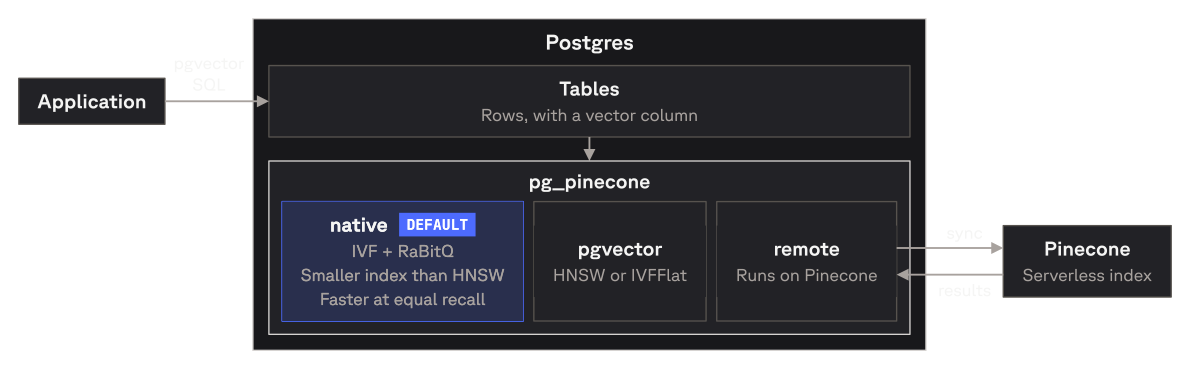
Engines
| Engine | Where the search runs | Use it for |
|---|---|---|
pgvector |
pgvector’s own HNSW or IVFFlat index, in Postgres | Tables that already have a pgvector index and don’t filter |
native (default) |
The search engine Pinecone uses at scale, in Postgres | Filtered and unfiltered search, with a small index and no network calls |
remote |
A Pinecone serverless index | A table that has outgrown one Postgres server |
Every switch can be reversed. The pg_pinecone docs cover how the engines compare and how to switch between them.
Quickstart
Requirements: PostgreSQL 17 or 18, superuser access, and pgvector installed on the server.
Install it one of two ways:
- Prebuilt release: download the archive for your platform and Postgres version from the releases page and copy its files into your Postgres installation, as step 1 of the quickstart shows.
- Docker:
pineconeteam/pg_pineconeis thepgvector/pgvectorimage withpg_pineconeadded, one tag per Postgres major:docker run -d -e POSTGRES_PASSWORD=secret pineconeteam/pg_pinecone:0.11.0-pg17(add-c shared_preload_libraries=pg_pineconefor theremoteengine).
Then create the extensions and index a vector column:
CREATE EXTENSION vector;
CREATE EXTENSION pg_pinecone;

CREATE TABLE items (id bigint PRIMARY KEY, embedding vector(3));
INSERT INTO items VALUES (1, '[1,2,3]'), (2, '[4,5,6]'), (3, '[7,8,9]');

-- Builds a native index. No API key or network access needed.
SELECT pinecone.create_index('items', 'embedding');

SELECT id FROM items ORDER BY embedding <=> '[1,2,4]' LIMIT 2;
For a full walkthrough on a sample table, including semantic search with embeddings, see the quickstart in the pg_pinecone docs.
Deploy
One-click Postgres 18 with pg_pinecone already installed:
- Railway: a database and a connection URL.
- Render: a private service. Other services in the same workspace and region connect over the private network.
Build from source
pg_pinecone is built with pgrx. You need a Rust
toolchain and the headers of the Postgres you’re building for (pg_config on your PATH, or
pass its path to --pg-config).
git clone https://github.com/pinecone-io/pg_pinecone.git
cd pg_pinecone/pg_pinecone
cargo install cargo-pgrx --version 0.19.2 --locked
cargo pgrx init --pg17 "$(which pg_config)"   # use --pg18 for PostgreSQL 18
cargo pgrx install --release                  # builds and installs into that Postgres
cargo pgrx install writes the extension into the Postgres pg_config points at; then
CREATE EXTENSION vector; CREATE EXTENSION pg_pinecone; as above. On x86_64 the build targets your
own CPU, so it runs anywhere you build it. For running the tests, see CONTRIBUTING.md.
Verifying releases
Release tarballs, the source zip, the Postgres.app package, and the SBOM
(pg_pinecone-<version>.cdx.json) carry GitHub build-provenance attestations. The Docker
images are also signed with keyless cosign. Pin the signer to this repo’s release workflows
on main or a v* tag; a run from any other branch is not a release.
ID='^https://github\.com/pinecone-io/pg_pinecone/\.github/workflows/(release|docker-publish)\.yml@refs/(heads/main|tags/v.+)$'

gh attestation verify pg_pinecone-<version>-pg18-linux-x86_64.tar.gz \
  --repo pinecone-io/pg_pinecone --cert-identity-regex "$ID"
gh attestation verify oci://pineconeteam/pg_pinecone:<version>-pg18 \
  --repo pinecone-io/pg_pinecone --cert-identity-regex "$ID"

cosign verify pineconeteam/pg_pinecone:<version>-pg18 \
  --certificate-oidc-issuer https://token.actions.githubusercontent.com \
  --certificate-identity-regexp "$ID"
Documentation
The pg_pinecone docs on docs.pinecone.io cover installation, the storage engines, switching engines, and full-text search.
In this repository:
- SQL reference: every function, setting, and error message
- Operator runbook: monitoring, upgrades, and maintenance; start with
SELECT * FROM pinecone.doctor() - Disaster recovery: restoring a
remotetable - Changelog
Support
- Questions and feedback: the Pinecone Discord community
- Bugs and feature requests: GitHub issues
- Security issues: see SECURITY.md
Contributing
Start with an issue. See CONTRIBUTING.md for how proposals and pull requests work.